Posted on
5:00 PM
by Wathan
ဓါတ္ပံုျပင္တာ ၀ါသနာ ပါတဲ႔သူေတြအတြက္ အလြယ္တစ္ကူ အသံုးျပဳႏိုင္တဲ႔ Portable ေလးေတြကို တင္ထားခဲ႔သမွ်ေတြကေန Link ေတြကို တစ္ေနရာတည္းမွာ ျပန္လည္စုစည္းေပးလိုက္ပါတယ္....Portable ေစာ့၀ဲေတြျဖစ္တဲ႔ အတြက္ အလြယ္တစ္ကူ အသံုးျပဳႏိုင္သလို သြားတဲ႔ေနရာတိုင္းကိုလည္း USB Drive တစ္ခုရွိရံုနဲ႔ အလြယ္တစ္ကူ သယ္ေဆာင္သြားႏိုင္ပါတယ္.....စိတ္၀င္စားးတယ္ဆိုရင္ေတာ့ ေအာက္မွာယူႏိုင္ပါတယ္....
Frame PhotoEditor 5.0 Portable
Artizen HDR Portable
Mojosoft Photo Frame Studio 2.4 Portable
Wondershare Photo Collage Studio 4.2.10.4
AVS Photo Editor 1.1.1.54 Portable
Elfin Photo Editor 1.0 Portable
MobaPhoto portable
Boxoft Photo Magic Maker 1.3.0.0 Portable
Beauty Guide 1.3 Portable
PhotoFiltre Studio X 10.3.3 Portable
Posted on
4:55 PM
by Wathan
Photo Editing & Saving Wizard Portable - 2MB
ေပါ့ေပါ့ ပါးပါးေလးနဲ႔ ဓာတ္ပံုေတြကို ျပဳျပင္ တည္းျဖတ္ ေပးႏိုင္တဲ႔ ေဆာ့ဝဲလ္ေလးပါ 2MB ပဲရွိပါတယ္..။
ကလိတာ ဝါသနာပါရင္ ေအာက္မွာ ေဒါင္းယူႏိုင္ပါတယ္..။
Photo Editing &Saving Wizard is the perfect solution to perform base photo editing tasks, finish photo editing in Adobe Photoshop and create quality JPEG files. A lot of compression and resizing options let you save JPEG images with any size you need, providing the maximum quality possible.
Our advanced technology and JPEG encoding engine allow you to edit and save photos preserving their original picture quality. Using Photo Editing & Saving Wizard is the best way to get your pictures ready for printing, sharing or storing. You can easily do batch processing with multiple images. Also Photo Editing & Saving Wizard supports uploading and saving images to free and easy to use photo hosting and photo sharing services. Photo Editing & Saving Wizard works as a standalone application as well as a Photoshop plug-in.
Homepage-http://winsoftmagic.com/ajc_features.html
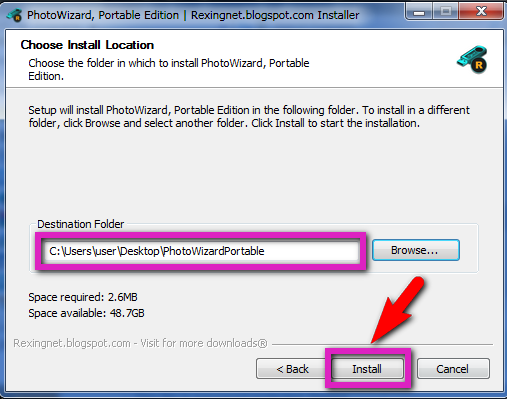
C-box မွာ အဆင္မေျပဘူးလို႔ ေျပာလာလို႔ Install လုပ္ပံုေလး တင္ျပလိုက္ပါတယ္...။
Photo Wizard Portable.exe ေလးကို Run လိုက္ပါ..။
ပံုထဲကလို ေပၚလာရင္ OK ႏွိပ္ပါ..။
ဒီေနရာမွာ Folder တခုခု ေရြးေပးလိုက္ပါ..။ က်ေနာ္ကေတာ့ Desktop ကိုပဲ Select ေပးလိုက္ပါတယ္..။ ျပီးရင္ ေအာက္ကပံုေတြအတိုင္း ဆက္လုပ္သြားပါ...။
Download Mediafire
ဝင္းကမာၻေက်ာ္(နည္းပညာမွတ္တမ္း)
Posted on
4:51 PM
by Wathan
ကမာၻေက်ာ္တဲ႔ Dictionary ေလးပါ..။
ေနာက္ဆံုး
Update Full Version ကိုမွ သံုးခ်င္တဲ႔သူမ်ား အသံုးျပဳႏိုင္ေအာင္ ျပန္လည္ မွ်ေဝ ေပးလိုက္ပါတယ္ ...။ ျမန္မာလိုေပၚေအာင္ေတာ့ အသံုးျပဳတတ္ၾကမယ္ထင္ပါတယ္....လိုအပ္တာေတြအားလံုးလဲ ပါျပီးသားပါ...။
Download Babylon 9.0.4.r10 Full 5.72MB
အဆင္မေျပတာရွိခဲ႔ရင္
C-box , Facebook Wall ,Comment တေနရာရာကေန ေျပာသြားခဲ့ပါ ေက်းဇူးတင္ပါတယ္..။
ျမန္မာလို ျမင္ရဖို႔ ဘယ္လိုလုပ္ရလဲလို႔ ေမးလာတဲ႔ သူငယ္ခ်င္းေတြ မ်ားလာလို႔ ဒီေန႔
( 9 March 2012 ) မွာ
Install ျပဳလုပ္ပံုေလးကို မသိေသးတဲ႔ တျခားသူငယ္ခ်င္းမ်ားပါ အဆင္ေျပေအာင္ ျပန္လည္ျဖည့္စြက္ ေရးသားလိုက္ပါတယ္..။
ေဒါင္း လို႔ရလာတဲ႔
RAR ဖိုင္ ေလးကို ျဖည္လိုက္ပါ
(Right Click >>Extract Here) ..။ ဖိုင္
(၄) ခုထြက္လာမွာပါ..။
အဲ့ဒီ
(၄) ခုထဲက
Babylon9 Setup.exe ဖိုင္ေလးကို
Double Click နဲ႔ R
UN ေပးလိုက္ပါ..
Install ကို မႏွိပ္ခင္ မလိုခ်င္တဲ႔
Toolbar ေတြကို ေရွ႕ကအမွန္ျခစ္ေလးေတြ ျဖဳတ္ေပးလိုက္ပါ....။ (အခ်ိန္အနည္းငယ္ၾကာပါတယ္)
ျမန္မာစာေတြ ျမင္ရဖို႔ကိုေတာ့ ေစာေစာက ျဖည္ထားတဲ႔ ဖိုင္
(၄) ခု ထဲမွာ
pandonma-english-myanmar.bgl ဆိုတဲ႔ဖိုင္ေလးကို
Double Click ျပီး
Run ေပးလိုက္ပါ...ျပီးရင္
Babylon 9 က
(+) လကၡဏာ ေလးကို ႏွိပ္ျပီး
Language မွာ
Other ကို ေရြးေပးလိုက္ပါ
ျပီးရင္
Babylon 9 မွာ သိခ်င္တဲ႔ စာလံုးကို ေရးျပီး
Enter ေခါက္လိုက္ပါ ... ဒါလဲ ျမန္မာစာေတြ မေပၚေသးဘူးဆိုရင္
(+) ေလးရဲ႕ ေဘးက ကမာၻလံုးပံုေလးကို
Click လိုက္ပါ.. ဒီေလာက္ဆိုရင္ အားလံုးအဆင္ေျပေလာက္ပါျပီ...:D
Full Version အျဖစ္ အျမဲတမ္း အသံုးျပဳႏိုင္ဖို႔ကိုေတာ့
Notepad ဖိုင္ေလးထဲက
User Name , Code License ေတြကို
Enter License မွာ တစ္လံုးခ်င္း ေရးထည့္ ေပးရမွာပါ
(Copy Paste လုပ္မရပါ
) ဒီလိုင္စင္ ကီး ေတြနဲ႔တင္ အဆင္ေျပေနလို႔
Patch ဖိုင္ကိုေတာင္ မသံုးလိုက္ေတာ့ပါဘူး..။
အားလံုး အဆင္ေျပေပ်ာ္ရႊင္ၾကပါေစဗ်ာ....။
ဝင္းကမာၻေက်ာ္(နည္းပညာမွတ္တမ္း)
Posted on
4:48 PM
by Wathan
ဓာတ္ပံုေတြကုိ သီခ်င္းနဲ႔ အယ္ဘမ္ လုပ္တဲ့ေဆာ့၀ဲလ္ေလးပါ။ လြယ္လဲလြယ္ပါတယ္။ Install လုပ္စရာလဲ မလုိပါဘူး Portable ေလးပါ။ လိုခ်င္ရင္ေတာ့ေအာက္မွာေဒါင္းယူလိုက္ပါခင္ဗ်ာ.......!!!
Ashampoo Slideshow Studio HD 1.0.2 Portable | 21.2MB(about)
HD Slideshows on Video, YouTube and DVD
Digital cameras have made photography easier than ever but sharing your pictures is still harder than it needs to be. Ashampoo Slideshow Studio HD changes all this. With its easy point-and-click interface and ready-to-use themes you can create great auto-playing slideshows with music and terrific animated transitions in a snap.
However, the real innovation is the output formats: You can’t just burn your slideshows to DVDs that will play on any home DVD player. You can also generate HD (high-definition) slideshows that you can upload to YouTube and MyVideo, or as MPEG2, MPEG4 or Windows Media video files that will play on pretty much any computer available. And since the slideshows are saved in a single file sharing them couldn’t be easier.
Slideshow Studio HD lets you share your images with anyone, anywhere, now. And the slideshows look like they were created by a professional graphic artist – because they were.
Point and click speed meets your creativity
If you’re in a hurry you just need to select your photos, select one of the great graphical themes and then click Produce Slideshow. You’ll be asked to choose your output format and whether you want HD or normal definition but that’s it.
If you want to get creative you can insert your own text and graphics on top of your slides, and also geometric shapes, photos overlaid on photos, text arranged along curves, tables, captions and more. You can also add subtitles, and “brand” your slideshows with logos in the corner. You can choose from a score of great graphical transitions between your slides, or have random transitions for every slide. You can add multiple background music or other audio tracks and have the length of the slideshow automatically match the length of your music.
Slideshow Editor
The Slideshow Editor has an intuitive timeline that shows the entire slideshow sequence graphically. You get a live preview and can edit components on the timeline with Drag & Drop. You can rotate, resize, show and hide all the elements you add to your slides, with individual fade-in and fade-out for each element.
Or you can just choose a theme and let Slideshow Studio HD do all the work for you. Again, you choose.
Timeline editing with drag & drop and preview
Cross-fades and graphical transitions between images
Preview for all fades and transitions in the timeline
Add background music for the entire show with multiple tracks
Add titles, subtitles, shaped text
Add images, logos and graphical shapes with fill, borders etc.
Fade-in and fade-out for all objects (images, texts etc.)
Rotate images directly in the editor
Ready-to-use themes for point-and-click speed
Automatic save feature protects your work
Output formats
•YouTube and MyVideo
Choose these formats to share your slideshows online on YouTube or MyVideo. You can choose the standard format or 720p HD videos.
MPEG1
MPEG1 gives you medium compression and only supports standard format (no HD) but it plays on all modern computers.
MPEG2, MPEG4
These formats offer better quality and compression and play on any computer with the correct codecs installed. MPEG2 and MPEG4 supports HD up to 1080p.
Windows Media 9
Here too, better quality and compression and HD up to 1080p. Windows Media 9 plays on any Windows machine with Windows Media Player 9 or higher and on many other machines with support for WMV files.
DVD
You can also burn your slideshows to standard DVDs that will play automatically when they are inserted in any DVD player, complete with the background music and transitions.
Posted on
4:43 PM
by Wathan


ဒီေန႔ေတာ့ ၿဖတ္ ၊ ညွပ္ ၊ ဆက္ လုပ္တာဝါသနာပါတဲ့ သူေတြ
ကလိႏိုင္ေအာင္ faceonbody ေဆာ့ဝဲေလးတင္ေပးလိုက္ပါတယ္။ portable ေလး
ဆိုေတာ့သံုးရတာ ေပါ့ေပါ့ပါးပါး နဲ႔ပိုၿပီးအဆင္ေၿပတာေပါ့။သူ႔အတြက္လိုအပ္တဲ့key
ေလးကို ကၽြန္ေတာ္အထဲမွာ ထည္႔ေပး ထားပါတယ္။ ပံုမွာ ေတြ႔ၾကတဲ့ အတိုင္း
မုတ္ဆိတ္ေမႊးနဲ႔ ေမာ္ဒယ္(လ္)ဂဲေတြ စသည္ၿဖင့္ေပါ့ အႏုပညာမ်က္ေစ့ ရွိရင္ ရွိ
သေလာက္လုပ္လို႔ရပါတယ္။ အသံုးၿပဳနည္းကလဲ ကၽြန္ေတာ္ေၿပာၿပစရာမလိုပါဘူး။
ဘာၿပီးရင္ ၊ ဘာဆက္လုပ္ရမယ္ ဆိုတာ ေဆာ့ဝဲကပဲ တစ္ဆင့္ခ်င္း ရွင္းၿပေပးပါ
လိမ္မယ္။ သူခိုင္းတဲ့အတိုင္း ေနာက္ကေနအသာေလး လိုက္လုပ္ရံုပါပဲ။ ဒါေပမဲ့
သူ႕ကိုအသံုၿပဳမယ္ဆိုရင္ အသံုးၿပဳမဲ့ ဓါတ္ပံုေတြကို picture ထဲက my picture
(သို႔) public picture ထဲကိုေၿပာင္းေပးၿပီးမွ ယူသံုးရင္ပိုၿပီးအဆင္ေၿပပါ လိမ္မယ္။
အၿခားေနရာေတြက ယူသံုးရင္ တစ္ခါ တစ္ခါ ဟမ္း ၿဖစ္ခ်င္လို႔ပါ။ key ထည္႔နည္း
ကေတာ့ portable. exe ေလးကို run လိုက္ပါ။ ၿပီရင္ Help မွActivate ကိုကလစ္ပါ။
က်လာတဲ့ box ထဲကို ကၽြန္ေတာ္ ထည္႔ေပးထားတဲ့ key ကို copy/past လုပ္ေပး
လိုက္ပါ။တစ္ကယ္လို႔ အဲလိုလုပ္ေပးလို႔မွ keyလက္မခံပဲ ေနာက္ထပ္ box တစ္ခုပဲ
ထပ္ထပ္တတ္ လာတယ္ဆိုရင္ FaceonBody.exe ကို Delete လုပ္ၿပီး ဖိုင္ထဲက
Faceonbody.exe ကို copy ယူၿပီး Desktop ေပၚ past ခ်လိုက္ပါ။ ၿပီးရင္Shortcut
ေပၚကို right click ေပးၿပီး propertiesကိုကလစ္ပါ...ေအာက္ကပံုကို ၾကည္႔ပါ
အနီေရာင္နဲ႔ ၿပထားပါတယ္

ၿပီးရင္ compatibility tab မွ Run this program in compatibility mode
for ဆိုတဲ့ စာေၾကာင္းေလး ေရွ႕က အကြက္ေလးမွ အမွန္ၿခစ္ေပးၿပီး apply/okေပး
လိုက္ပါ။ ေအာက္က ပံုကိုၾကည္႔ပါ အနီေရာင္နဲ႔ ၿပထားပါတယ္..
ၿပီးရင္key ၿဖည္႔ေပးလိုက္ပါ။ ဖိုင္ဆိုဒ္ကလဲ 1.65MB ပဲရွိပါတယ္။ ေအာက္မွာယူသြား
လိုက္ပါ။ အဆင္မေၿပတာတစ္ခုခုရွိခဲ့ရင္ c.box ေလးမွာေၿပာေပးခဲ့ၾကပါဦး။ အားလံုးေပ်ာ္ရြင္
ပါေစ...ဗ်ာ။
Posted on
4:40 PM
by Wathan
အခုေနာက္ပုိင္း Android OS သုံးဖုန္းေတြကအရမ္းေခတ္စားလာတယ္။ တရုတ္နုိင္ငံထုတ္ Huawei နဲ႕ ZTE တုိ႕လုိ CDMA ဖုန္းေတြမွာေတာင္မွ Android OS ကုိအသုံးျပဳထားတာေတြ႕ရပါတယ္။ အခုက်ြန္ေတာ္ေပးမွာက MyanDroid Soft Keyboard ေလးပါ၊ Zawgyi Font သုံးထားပါတယ္။ ဖုန္းဆုိင္ေတြမွာ သြားသြင္းရင္ အနည္းဆုံး ခုႏွစ္ေထာင္ေလာက္ေပးရပါတယ္။ ဒီေတာ့ ကိုယ့္ဘာသာကုိသြင္းတာက အေကာင္းဆုံးပါပဲ။သြင္းပုံသြင္းနည္းကုိ ေအာက္မွာဖတ္ပါ။ အရင္ဆုံးေအာက္မွာေပးထားတဲ့ ဖုိင္ႏွစ္ခုကုိ အရင္ ေဒါင္းလုိက္ပါ။
Mydroid Soft Keybord အားရယူရန္
Soft Keybord အားရယူရန္
ေဒါင္းျပီးျပီဆုိ၇င္ အဲဒီ ႏွစ္ဖုိင္စလုံးကုိ ဖုန္းထဲမွာ install လုပ္ပါ။
install လုပ္ျပီးျပီဆုိရင္ ဖုန္းရဲ႕ setting ထဲကုိသြားျပီး language and keyboard ကုိေရြးပါ။
Mydroid soft keyboard ကုိ အမွန္ျခစ္ေပးပါ။

All program menu ထဲကုိသြားျပီး zawgyi ipad program ကုိဖြင့္ပါ။ျပီးရင္ Text box ထဲမွာ ငါးစကၠန္႕ ခန္႕ဖိထားပါ။
Input Method ကုိေရြးပါ။ Select input method ထဲမွာ Mydroid soft keyboard ကုိေရြးလုိက္ပါ
ျမန္မာစာကီးဘုတ္ ေပၚလာပါလိမ့္မယ္။ အဲဒီမွာတင္မျပီးေသးပါဘူး ။ အခုသြင္းျပီးသေလာက္က ျမန္မာ keyboard သြင္းထားတဲ့အဆင့္ပဲရွိပါေသးတယ္။ ျမန္မာေဖာင့္ကုိ ဖုန္းရဲ႕ function ေတြ (ဥပမာ- message , contacts) မွာ ေရးနုိင္ ဖတ္နုိင္ေအာင္ ျမန္မာ ေဖာင့္ထည့္ရဦးမွာပါ။ ေအာက္မွာဆက္ဖတ္ပါ။


ပထမဆံုးအေနနဲ ့ေအာက္က package ကုိ ေဒါင္းပီး ဖုန္း SDcard ထဲကုိျဖည့္လိုက္ပါ။
Click here to download
zip ျဖည္လိုက္ရင္ေတာ့ Root Explorer (2.9.3).apk နွင္ ့DroidSansFallback.ttf နွစ္ခုရလာမွာပါ
DroidSansFallback.ttf ကေတာ့ zawgyi ေဖာင့္ကုိ rename လုပ္ထားတာပါ ။
Root Explorer ကုိ သြင္းလိုက္ပါ ။ သြင္းျပီးရင္ေတာ့ (root explorer ကုိ စဖြင့္ဖြင့္ခ်င္းမွာ root access ကုိ allow လုပ္မလားလာေမးပါလိမ့္မယ္ allow ကုိေရြးပါ ဒါမွေနာက္ပိုင္းေတြဆက္လုပ္လုိ့ရမွာပါ) Root explorer ကေန download လုပ္ျပိးzipျဖည္ထားတဲ့ folder ထဲသြားပါ။ ေရာက္ရင္ေတာ့ DroidSansFallback.ttf ကုိ long click (ၾကာၾကာဖိ)ျပီး copy လုပ္ပါ ။
ဒီထိျပီးရင္ေတာ့ /system/fonts ထဲသြားပါ ။ ေရာက္ရင္ေတာ့ ေအာက္ကပံုအတိုင္း (Mount R/W ) အနီျပထားတာကုိႏိုပ္ပါ။

အားလံုးျပီးရင္ေအာက္ကပံုအတိုင္းျဖစ္ေနရပါမယ္
ဒီအထိျပိးရင္ DroidSansFallback.ttf ကုိ permission ေျပာင္းေပးရပါမယ္ အဲအတြက္ DroidSansFallback.ttf ကုိ ၾကာၾကာဖိထားပါ ေအာက္ကပံုအတိုင္းေပၚလာပါမယ္။
ေအာက္ပံုအတိုင္း permission ကုိေပးလုိက္ပါ
ျပီးရင္ေတာ့ OK ႏွိပ္ပါ။ ျပီးရင္ paste ကုိႏိွပ္လို ့ရပါျပီ ။
ႏိွပ္လိုက္ရင္ Warning ရွိျပီးသားလုိ့ လာျပပါလိမ့္မယ္ ။ overwirte လိုက္ပါ Yes ကုိေရြးပါ ။
အခုဆိုရင္ ျမန္မာ ေဖာင့္ ျမင္ရျပီျဖစ္ပါတယ္။ ျမန္မာလုိ ရိုက္ခ်င္ရင္ေတာ့ Message ထဲဝင္ျပီး စမ္းသပ္ႏုိင္ပါတယ္။
Message ကုိဖြင့္ပါ ။ New Message ထဲကို၀င္ပါ။ စာရိုက္တဲ့ေနရာကုိ ဖိထားလိုက္ပါ။
Input Method ဆိုပီးေပၚလာပါလိမ့္မယ္။ အဲဒီမွာ MyanDroid Soft Keyborad ကုိ ေရြးလိုက္ပါ။ ျပီးရင္ ရိုက္လုိ႕ရပါျပီ။ အားလုံးအဆင္ေျပလိမ့္မယ္လုိ႕ေမွ်ာ္လင့္ပါတယ္။ က်ြန္ေတာ္လုပ္တာေတာ့ အဆင္ေျပပါတယ္။ အားလုံးပဲစမ္းၾကည့္လိုက္ၾကပါဦး။
Thet Naing Soe (UCSM CYBER Admin)
ကြန္ပ်ဴတာတကၠသုိလ္ေက်ာင္းသူေက်ာင္းသားမ်ားဖုိရမ္မွကူးယူေဖၚျပသည္။
Posted on
4:35 PM
by Wathan
Converter ထဲမွာ Any Video Converter ေလးက format ေတာ္ေတာ္ေလးစုံၿပီးေတာ့ အသံုးျပဳရတာလည္း အရမ္းလြယ္ကူပါတယ္..။
ေဆာ့ဝဲလ္ ကို ေအာက္က မူရင္း ဒါရိုက္ လင့္ခ္ ေနေဒါင္းယူႏိုင္ျပီး
Full Version အေနနဲ႔ အျမဲတမ္း အသံုးျပဳႏိုင္ဖိို႔ Patch ေလးကိုေတာ့
အားလံုး အဆင္ေျပ ေပ်ာ္ရႊင္ၾကပါေစဗ်ားးး။
ဝင္းကမာၻေက်ာ္(နည္းပညာမွတ္တမ္း)